Your day at a glance
By the end of this page you will be able to open your dashboard and know what needs you first.
The pictures in this manual were taken on one organisation's system. Yours uses some different words. The buttons, and where they sit on the screen, are the same.
| Where a picture says | Your screen says |
|---|---|
| Care Journey | Service Episode |
| Entry | Referral |
| Kaiāwhina | Case Worker |
| Whānau | Service User |
Your dashboard
This is what you land on when you sign in.
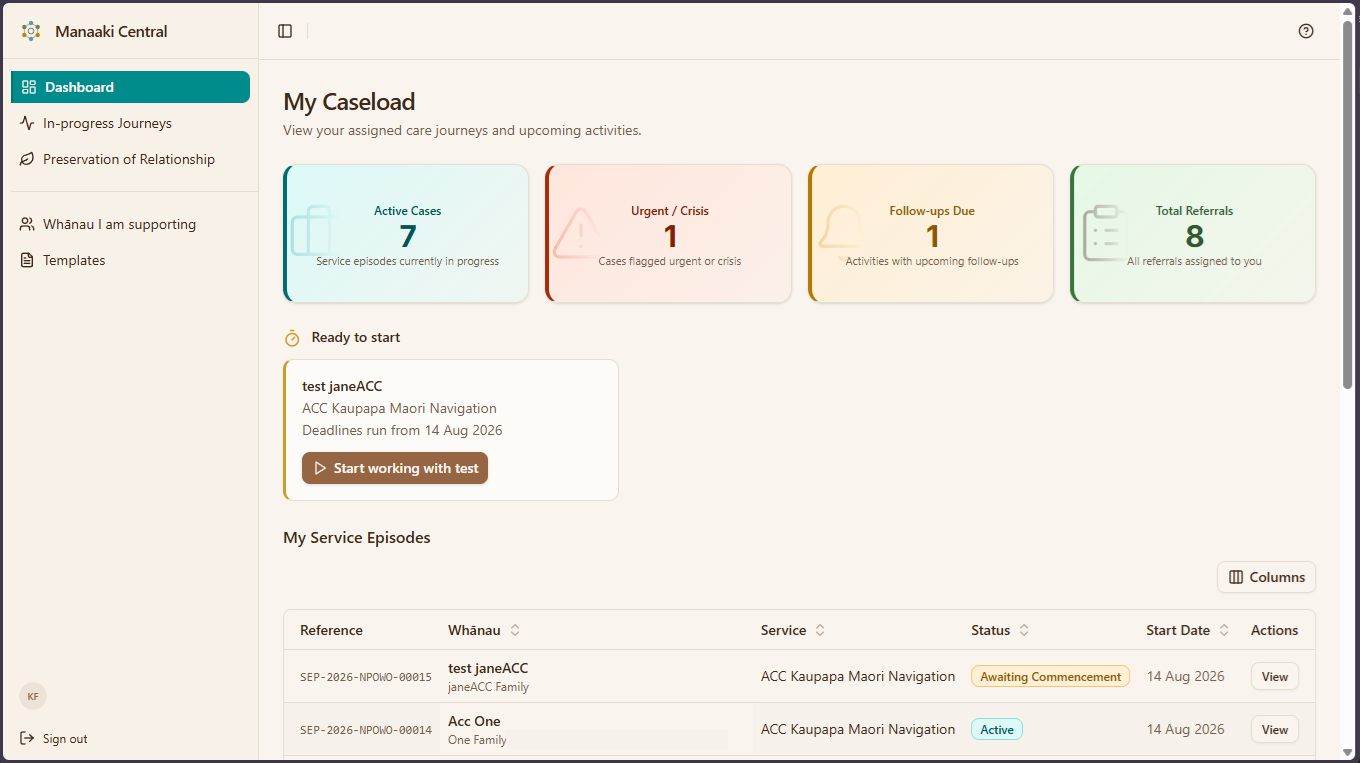
The tiles across the top
Each one is a count of something that might need you. Click a tile to see what is behind it.
| Tile | What it counts |
|---|---|
| Active Cases | People you are working with right now |
| Urgent / Crisis | Cases flagged as urgent — look at these first |
| Follow-ups Due | Things you said you would come back to |
| Total Referrals | Everything assigned to you, open or not |
Ready to start
If someone has been assigned to you but the work has not begun, they appear here with a Start working with... button.
Clicking Start working with... does more than tidy your list. It starts the service, and the banner tells you which date the compliance deadlines will then run from.
That date was chosen when they were accepted, so check it looks right. If you have already been working with them for a fortnight, do not let today quietly become the official start.
Depending on your version, this may read Commence Episode instead.
Your list
Underneath is everyone assigned to you, with their reference, their service, their status and when they started. Click View on any row to open them.
The list starts with whoever you worked on most recently, so the top of the list is usually where you left off yesterday. On a wide screen you also get Last Activity and Last Entry Change dates, and you can select any of the headers to reorder the list.
Where to start each day
A reasonable order:
- Urgent / Crisis — anything flagged urgent.
- Follow-ups Due — you told someone you would come back to them.
- Ready to start — work that has been waiting on you to begin.
- Everything else — your ordinary visits and write-ups.
If it does not look like this
- Your tiles are all zero — nothing is assigned to you yet. That is a question for whoever allocates work.
- You see a different dashboard entirely — dashboards differ by job. If yours is about enquiries arriving rather than people you are supporting, you are on the intake dashboard: see your day at a glance for intake officers.
- A number looks wrong — refresh the page. The counts are calculated when the page loads.
What next
- Working with someone — what to do once you open one of these.