Referrals and Service Episodes
A Referral is how somebody enters service. It records who they are, who referred them, what they need, and what consent is on file.
Once it is dispatched to a service and somebody is assigned, a Service Episode is created alongside it. That is the record of the work itself.
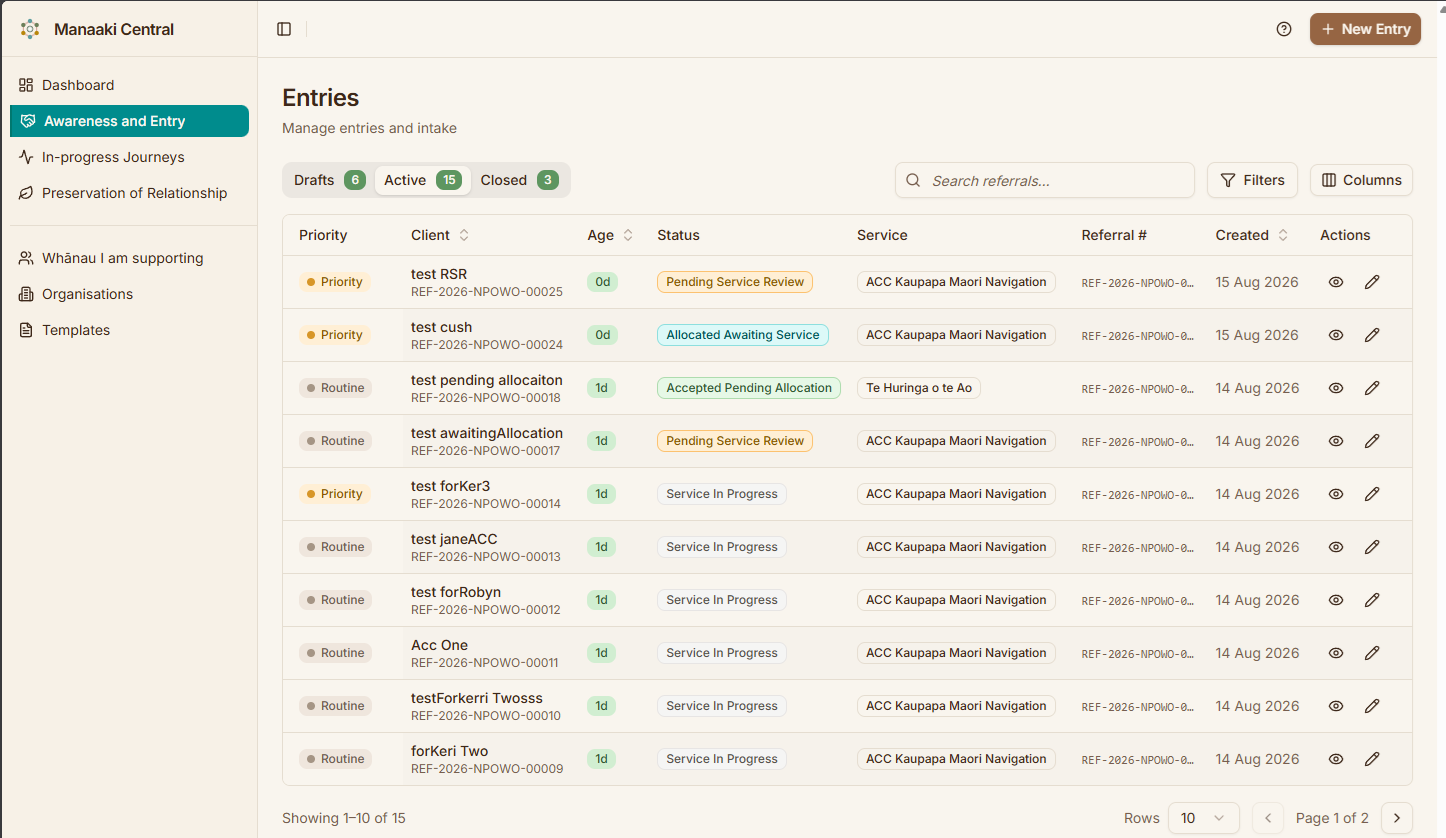
The Referral is the intake record — the request for service. The Service Episode is the delivery record, created once a Case Worker is allocated.
They have separate statuses and separate lifecycles, and both stay linked to the person. This is the single most useful thing to understand about the system: when somebody says "it's still showing as pending", the first question is which of the two records they mean.
The journey end to end
- Intake — a staff member completes the three-step Referral form
- Dispatch — the Referral is sent to a service, either accepted directly or sent to a manager for approval
- Allocation — a Case Worker is assigned and a Service Episode is created
- Delivery — the Case Worker starts the Service Episode and records Activities
- Closure — the Service Episode is completed or closed
Each of those steps has its own how-to page. This page is only about what the things are.
The shape of the form
The Referral form is a three-step wizard:
| Step | Name | Covers |
|---|---|---|
| 1 | Intake | Client & referral |
| 2 | Consent | Permissions on file |
| 3 | Review & Submit | Confirm & dispatch |
Finish the first step and click Continue, and the Referral exists — a part-finished one is never lost. Before that point, leaving the page loses what you typed.
Ways a Referral can start
| Route | How |
|---|---|
| New Referral | The + New Entry button in the header, or /entries/new |
| From a client | The New Entry link on a client's whānau tab, which preselects that person |
Referral types
The referral type determines who is recorded as the referrer:
| Type | Referrer is |
|---|---|
| Self | The person themselves |
| Whānau | A whānau member |
| Educational | A contact at a school or educational organisation |
| Professional | A contact at another organisation |
Who can create one
The + New Entry button appears for staff in an intake position, and for supervisors and programme managers. If you are in a Case Worker position you will not see it — Referrals come to you already allocated.
What happens after dispatch is also role-dependent: approving a service request and allocating a Case Worker are supervisor and programme manager actions.
Visibility is worked out from the positions you hold on your assigned services, falling back to your role if you have no service assignments. So two people with the same job title can see different things if their service positions differ.
If you think you should be able to create one and cannot, ask your administrator to check your service positions — it is rarely a fault.
Statuses
A Referral moves through intake statuses, then into allocation and delivery. Consent is tracked separately and can change at any point.
For the complete list with definitions, and the lifecycle diagrams, see how the work flows.
The pages in this section
| Page | Covers |
|---|---|
| Creating an entry | The full three-step walkthrough |
| Finding or creating the client | Searching for someone, or adding them |
| Entry details | Every field on step 1, and what it is for |
| Uploading documents | Attaching files and consent forms |
| Submitting for review | Dispatch, approval and allocation |
Where to go next
- How the work flows — the diagrams and the full status reference
- Service Episodes — what happens once delivery starts
- Creating a Referral — the actual how-to
- Glossary — every term in one list