Staying on top of deadlines
By the end of this page you will know where to find what is due, and what to do about it.
The pictures in this manual were taken on one organisation's system. Yours uses some different words. The buttons, and where they sit on the screen, are the same.
| Where a picture says | Your screen says |
|---|---|
| Care Journey | Service Episode |
| Entry | Referral |
| Kaiāwhina | Case Worker |
| Whānau | Service User |
The compliance panel
It sits down the right-hand side of someone's overview page.
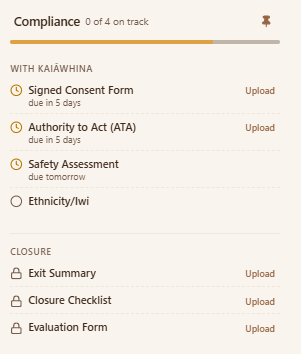
Each line is a piece of paperwork your service requires. Next to it is when it is due, and an Upload link for when you have it.
Reading it
| What you see | What it means |
|---|---|
| due in 4 days | You have time, but it is counting down |
| due today | Today |
| A locked padlock | Not needed yet — it unlocks when the work reaches that stage |
| 0 of 4 on track | How many of the required items are currently in good shape |
The items in the Closure group stay locked until you start finishing the work. You cannot upload an exit summary for someone whose work has not ended.
Where the dates come from
Deadlines are counted from the date the service started — not the date the Referral arrived, and not today.
If someone was accepted a fortnight ago but nobody clicked Start working with... until this morning, the system thinks the work started this morning. Every deadline is then two weeks out.
Get the start date right at the beginning. Correcting it later is much more awkward — see working with someone.
Uploading what is due
- Click Upload on the line for the item.
- Choose the file from your computer or phone.
- Confirm what kind of document it is.
The line updates once the document is attached.
Pick the type that actually describes the document, not the closest thing on the list. The type is how the system knows what it has been given — the file name is not enough.
If you have uploaded something and the line still shows as outstanding, the type you chose is the first thing to check.
What happens if something is late
Day to day, nothing is blocked or switched off. You can keep working. The item simply shows as outstanding.
It matters at the end. When you come to close the work, anything still missing is listed as a blocker, and you have to write a justification before you can finish. See finishing up.
Being late is a conversation, not a lockout. If a whānau will not sign something, record what you have done and say so — that is a better record than an empty line, and it is what you will want to point at when you write that justification.
If it does not look like this
- The panel is not there — the service has not started yet. Start it from the banner at the top of the overview page.
- An item you expected is missing — requirements are set per service. A different service asks for different things.
- You uploaded something but it still shows as due — check the document type you chose. That is almost always the reason.
- Everything is locked — the work has not begun, or it has already closed.