Your day at a glance
By the end of this page you will be able to open your dashboard and know what needs you first.
The pictures in this manual were taken on one organisation's system. Yours uses some different words. The buttons, and where they sit on the screen, are the same.
| Where a picture says | Your screen says |
|---|---|
| Care Journey | Service Episode |
| Entry | Referral |
| Kaiāwhina | Case Worker |
| Whānau | Service User |
Your dashboard
This is what you land on when you sign in. It is about what is arriving, rather than who you are supporting — that is the difference between your dashboard and a Case Worker's.
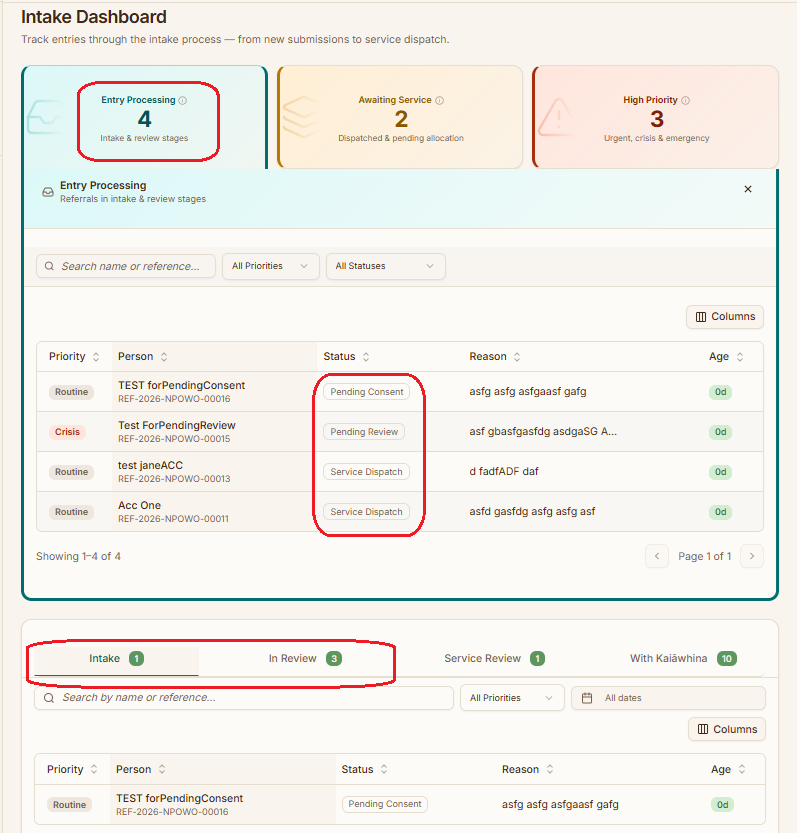
The tabs across the middle
Each tab is a stage. An enquiry moves left to right as it is dealt with, so the leftmost tab is where new work appears and the rightmost is work that is nearly out of your hands.
The count on each tab is how many are sitting at that stage. A number that keeps growing on one tab is the useful signal — it means work is arriving faster than it is moving on.
You do not have to clear one tab before looking at another. Urgency beats stage — a crisis enquiry that arrived this morning matters more than something routine that has been waiting a week.
Where to start each day
A reasonable order:
- Anything marked urgent or crisis, wherever it is sitting.
- New enquiries — get them recorded while the detail is fresh.
- Anything waiting on you — entries you sent for approval that have come back, or that have been sitting without a decision.
- Everything else.
If it does not look like this
- Your tabs are all empty — nothing has been submitted yet, or nothing is assigned to the services you cover.
- You see a list of people rather than enquiries — you are on the Case Worker dashboard. See your day at a glance for that one.
- A number looks wrong — refresh the page. The counts are calculated when the page loads.
What next
- Taking on someone new — the whole intake, start to finish.
- There is a fuller, field-by-field breakdown on the intake officer dashboard reference page.